 |
|
| 1. | login screen |
| 2. | search before login |
| 3. | signup |
| 4. | change roll |
| 5. | settings |
| . | settings payment method |
| 6. | delivery_home |
| 7. | my store |
| 8. | left menu |
| 9. | my items |
| 10. | adding item |
| 11. | category management |
| 12. | category edit |
| 13. | chatting |
| 14. | accept delivery |
| 15. | pickup item |
| 16. | search_result[check #2] |
| 17. | cart |
| 18. | payment |
| 19. | review item |
| 20. | favorites |
| [Resources] | |
| 1. | schedule |
| 2. | bugs and errors |
| 3. | bad iphone pages |
| 4. | food pictures |
| 5. | logo, car icon |
| 6. | original plan |
| 7. | Email Feedback & Results |
| [Index] | |
| Finished | |
| Unfinished Or Retouch needed | |
| New |
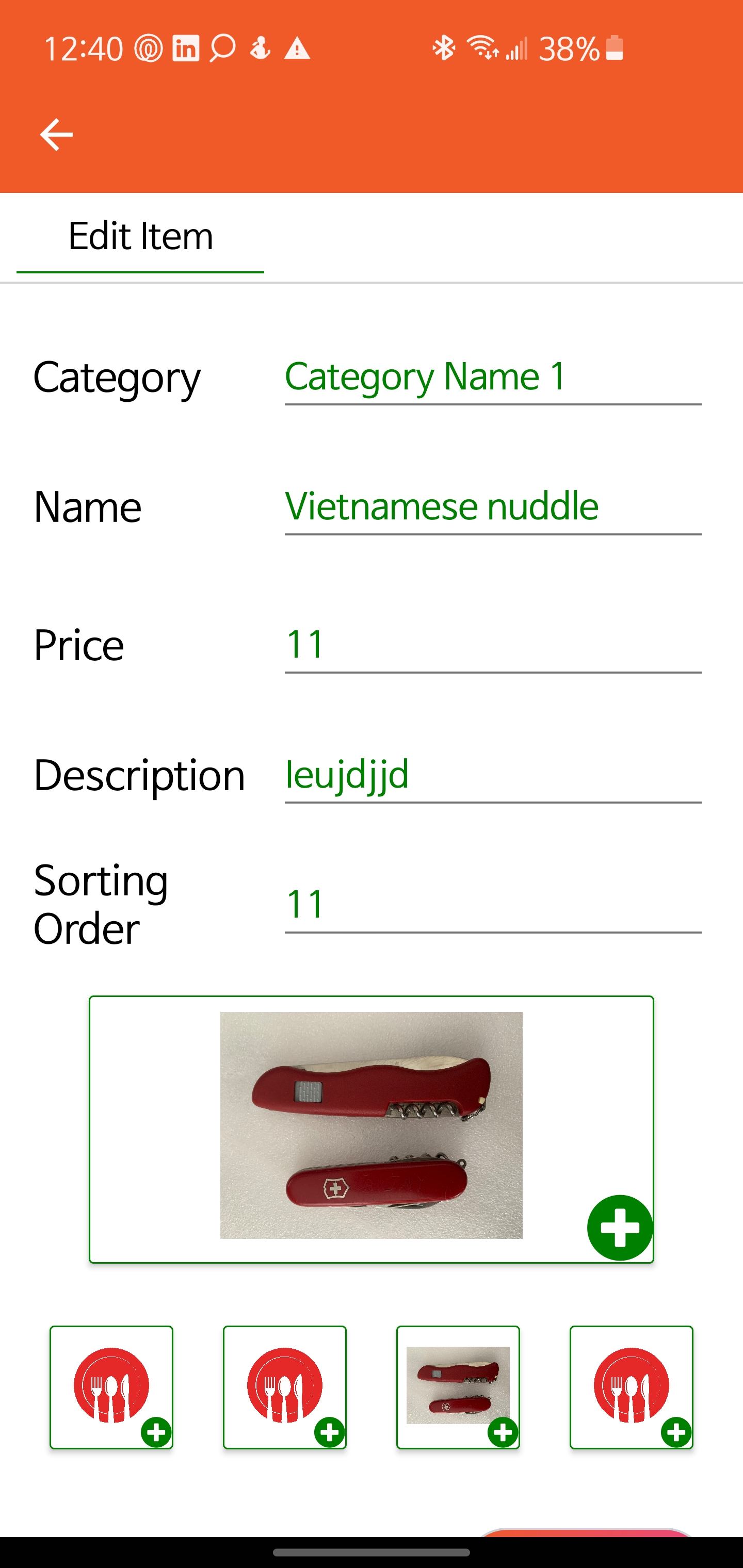
| 1 : item edit | I'll send you item by item as Im not infront of pc. Number of feed back is not sure at the moment. 1.Line height hasn't changed. Put all components in one page. 2.Item image should be filled in to 2:1 ratio frame. Not stratched nor shrieked. (I think restaurant main picture section is OK) to be continued |
http://plan.molieats.com/feedback/1.jpg | |
| 2: item's 4 sub images | Same rule should be applied to the 4 sub images in 1:1 ratio. No white or margin area needed. |
http://plan.molieats.com/feedback/2.jpg | |
| 3: Add item button | Where's add item button? | http://plan.molieats.com/feedback/3.jpg | |
| 4: Go back arrow on My item page | Please add go back arrow | http://plan.molieats.com/feedback/4.jpg | |
| 5: Category Page | 1. Need "go back" arrow 2. Category title visible area is short Currently 15 characters make it 50 3. When the title is long, the beginning part is not showing eveb after saving. (Please test by typing long title of category, and you'll see it) |
http://plan.molieats.com/feedback/5.jpg | |
| 6: My Store : Postal Code & Auto select address |
1. Postal code missing 2. All address related page should use automatic Ajax style input. (Currently it's done only on My Cart page) |
http://plan.molieats.com/feedback/6.jpg | |
| 7: Change Rolls | Radio button type requested. Change the plan again. |
http://plan.molieats.com/feedback/7.jpg | |
| 8: Login | 1. Too slogan: font size and font is not same 2. Email, Password input : too big. Make them same as the plan 3. Facebook, Google button: too big Make same ratio as thr plan. *** Font style is not critical as we can change later. But please make the size same as much as possible. |
http://plan.molieats.com/feedback/8.jpg | |
| 8: Login 2: After touching | 1. When I touch the Email input area, Why whole page shurinks ? Facebook, Google button don't need to be visible when email input area toiched. |
http://plan.molieats.com/feedback/9.jpg | |
| 10: main logo at landing page | Please use high resolution logo for landing page. It's too blurry. | http://plan.molieats.com/feedback/10.jpg | |
| 11: Registration | 1. Font: reduce the size 2. Line Height: reduce *** Same rule applies to all pages. Whole input item and button should be visible without scroll |
http://plan.molieats.com/feedback/11.jpg | |
| 12: Registration- input area | 1. Same issue as category title. All the beginning parts are not visible when the input value is long *** please reduce font size for entire Android app pages *** make them bigger whole input area. Use 100% width in center alignment |
http://plan.molieats.com/feedback/12.jpg | |
| 13: Registration Store Input | 1.Same issue: Line height and font size(reduce both and make them same as the plan - My Store) 2. Store Image : this is done on My Store Page. (Ratio and No white area Issue) Why don't you use same code? 3. Automatic Address Input like Cart page 4. Buttons are not finished. |
http://plan.molieats.com/feedback/13.jpg | |
| 14: regarding feedbacks | Rahul, Some of the feedbacks are out of this UI, cosmetic issues. You can mark them if you judge them as out of this scope and move them to next milestone with main search page modification. Currently looks better than before. And from now, all pages should follow same format. It's the first and last milestone for UI, cosmetic improvements. |
http://plan.molieats.com/feedback/14.jpg | |
| 15: Search function (type C) | 1. Minimum Search character setting : 3 ¡Ùwhen type 'a' and enter, page goes freeze. |
http://plan.molieats.com/feedback/15.jpg | |
| 16: Seach result page type A) | 1. Item name and description area is too small to display text properly. ** currently only half of texts are visible |
http://plan.molieats.com/feedback/16.jpg | |
| 17: Display item image for 1 item (type A) | Height should be 50% 2:1 ratio Slide should be started automatically after 3 seconds |
http://plan.molieats.com/feedback/17.jpg | |
| 18: store and item display (type A,C) | 1.store item images not showing 2. Item description area (Font, size, alignment) 2.See the plan. |
http://plan.molieats.com/feedback/18.jpg | |
| : Go to main Button width on Signup | http://plan.molieats.com/feedback/19.jpg | ||
| Feedback: My Store Image (Not changing, Size and Ratio) |
1.function: I tried to change it , it shows the old one when Save clicked Type A: Should be fixed in this milestone 2.UI has not Changed Size and ratio - no blank(white area) Type A |
http://plan.molieats.com/feedback/20.jpg | |
| items for selected category | Dummy items or unrelated items are showing when the category clicked Type B: should be done in this milestone but IF THIS IS TEMPORARY STATUS AND YOU'RE AWARE OF IT, YOU CAN FIX IT USING NEXT MILESTONE. |
http://plan.molieats.com/feedback/21.jpg | |
| item page: price format, images | 1.Price format; $0.00 (default place holder) Type A 2.Image handling Use zoomed image to fill whole area with same original ratio Type B |
http://plan.molieats.com/feedback/22.jpg | |
| Category - place holder | after saving even after clicking another link, the last category name stays when came back. | http://plan.molieats.com/feedback/23.jpg | |
| Delivery Car Icon | 1.Remove top right icon : it was for role changing but now the left menu does for it.Type A 2.Change car icon to top view Please find simple one or use what I gave you Type B |
http://plan.molieats.com/feedback/24.jpg | |
| Question: Uploading notice | Is this what you did or default message from Xamarin? Just asking. I like this. |
http://plan.molieats.com/feedback/25.jpg | |
| Bold to item name | This is Type A issue | http://plan.molieats.com/feedback/26.jpg | |
| Role- Text alignment | Some times it centered some times left alignment. Please make it left alignment. Type A |
http://plan.molieats.com/feedback/27.jpg | |
| item description length | Today, I saw real improvements on your work and felt that now you're starting to understand what is my level of expectation. On the other hand, I'm a little disappointed that now you seems to understand the the details. Anyway, since you showed me how you're capable of doing this, I want you to speed up the process. There's some more feedbacks and to be implemented, but it'll be minor issues and I'm sure that you can handle it. Attachment is one of minor things to be changed. |
http://plan.molieats.com/feedback/28.jpg | |
| Cancel button needed when image changed |
There's no way to go back Even if Android system back touch and IOS back swape action work, but cancel butron or if user touchs anywhere, popup screen should be disappeared. Type A |
http://plan.molieats.com/feedback/29.jpg | |
| Category name should be identical | 1. For the one restaurant, category name should be identical 2. After the button 'Add' clicked, please clear the input area Type A |
http://plan.molieats.com/feedback/30.jpg | |
| item image under store | Same old issue | http://plan.molieats.com/feedback/31.jpg | |
| category not working | Under store searching, items and category area not programmed Type B | http://plan.molieats.com/feedback/32.jpg | |
| empty screen when comeback from item | On item search page, when come back by clicking back arrow, search page shows empty page. Type A | http://plan.molieats.com/feedback/33.jpg | |
| item top, item image size | Item page top: not following general rule. (Logo and page location title) Item image ratio is 2:1 Type A |
http://plan.molieats.com/feedback/34.jpg | |
| Selected store type button should be different |
1. Typo: Supermarket -> full word display Type B 2. When clicked(touched) button color should be reversed or bordered or changed in some way so user can be noticed what is clicked. Type B 3. Multiple condition query. Search keyword and category should be combined in 'where' statement sql. Type C |
http://plan.molieats.com/feedback/35.jpg | |
| Category change not applies | On the item page. I changed category from A to B but it saves old one again Type A | http://plan.molieats.com/feedback/36.jpg | Rahul(0607): To be done in the next milestone. Not programmed yet. |
| item descriptions not showing properly |
If you can't handle this for 2 line of description, Please make it 1 line Type A |
http://plan.molieats.com/feedback/37.jpg | Rahul(0607): Fixed. Displaying one line of description. |
| Address input method issue | Still it takes free writing. Make it same method like delivery request page. Type B | http://plan.molieats.com/feedback/38.jpg | Rahul(0607): To be done in the next milestone. New Requirement. |
| category name issue | 1.Cat Name should be identical 2.Category name can't be updated 3.Sub items not showing properly Type A |
http://plan.molieats.com/feedback/39.jpg | Rahul(0607): Fixed Rahul(0607): To be done in the milestone Rahul(0607): To be done in the next milestone. Not programmed yet. |
| item images under the store not showing |
1.never worked Type A | http://plan.molieats.com/feedback/40.jpg | Rahul(0607): Fixed |
| 'accoun' -> 'account' | t' is missing only before login | http://plan.molieats.com/feedback/41.jpg | |
| Forgot password | Password retrieval is generally essential function and requested from the beginning. Type A | http://plan.molieats.com/feedback/42.jpg | |
| Login & Map landing screen | Not needed or requested | http://plan.molieats.com/feedback/43.jpg | |
| Button text change on Sign Up and Store setup |
Register & Store -> Register & Store Setup | http://plan.molieats.com/feedback/44.jpg | |
| STATUS | Rahul, It looks like you fixed over 90%, thanks This is just an update of all feedbacks. |
http://plan.molieats.com/feedback/molieats feedback status.xlsx | |
| Accoun -> Account | Still not fixed on my S10. | http://plan.molieats.com/feedback/46.jpg | |
| plaseholder image is ugly | Please use this Camera Image | http://plan.molieats.com/feedback/47.png | |